[ADD] estate_auction: estate auction module for auctioning properties.#1231
Draft
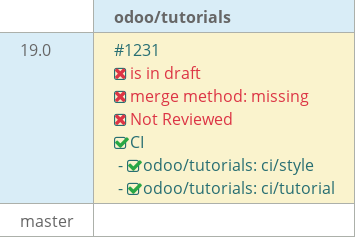
kapat-odoo wants to merge 20 commits intoodoo:19.0from
Draft
[ADD] estate_auction: estate auction module for auctioning properties.#1231kapat-odoo wants to merge 20 commits intoodoo:19.0from
kapat-odoo wants to merge 20 commits intoodoo:19.0from
Conversation


Initialized the 'estate' module and made it installable in Odoo.

This commit bootstraps the custom estate module and sets up the minimal
structure required by Odoo to load and install a new application.

Created the module structure 'estate' inside the tutorials directory,
configured basic module metadata. Restarted the server
to load the module, then verified it is visible in the Apps menu.

Chapter 1 and 2 of the documentation.
Added the 'estate.property' model with all required fields and enforce
field constraints.

This commit implements the core data structure for the Real Estate
module, ensuring properties have the appropriate attributes stored
in the database and enforcing essential constraints to maintain data
quality. These fields serve as the foundation for later views,
business logic, and workflows built on top of the model.

Defined fields such as name, description, postcode, date_availability,
expected_price, selling_price, bedrooms, living_area, facades, garage, garden,
garden_area, garden_orientation as per Chapter 3 of documentation.
Implemented security access control to the estate module to remove
the missing access rules warning and allow proper user access.

Without explicit access rules, Odoo blocks access to the new models and
logs a warning about missing security rules. Adding these ACL entries
ensures that regular users in the 'base.group_user' group can interact
with the estate models as intended, providing a baseline security setup
for the module.

As per discussed in Chapter 4 provided permission to base.group_user to
read, write, create and unlink.
…odule.

Made the estate module interactive and visible in root menu of Odoo, also
implemented action menus with different menu items and hierarchy.
Now the listings of property appears in list view and while creating a
new property it opens in form view while also making changes to fields to
make them have default values and made sure they cannot be copied.

As per Chapter 5 of Documentation.
Added list and form views for estate.property along with search and custom
filters like (to check availability and Group by Postcode).

This commit replaces the default auto-generated views with list view for
providing a quick glance at all important attributes related to the property and
implemented better custom form view (which now also features 'state' selection
which will be further useful in checking functionality of the custom filter).

Along with that also added fields in search so that it can provide user to
choose which particular attribute the search should query, also implemented
custom filter for checking if the property is available by looking up the state
and a 'Group By Postcode'.

As per discussed in Chapter 6.
Added relational fields like Property Type, Buyer and Salesperson, Property Tags
and Offers.

Property Type makes it more dynamic and easy to add common types of property
types to any new property listing while also maintaining its own table as
'estate_property_type', Buyer and Salesperson have been defined based on their
property such that further validating can be done by using their respective
external:id, Property tags allows multiple properties to have multiple tags
which is displayed in the form view and is maintained in a separate join table
and lastly the offers tab lists all the offers particular to that property.

As per discussed in Chapter 7.
…d offers.

Added compute fields to automate the business logic and computation of fields
which are dependent on another field and needs to be changed depending on the
modified field.

The first such field is 'Total Area' which is the sum of 'Living Area' and
'Garden Area'. Second field 'Best Price' which automatically takes the highest
'Offer Price' from all the 'Offers' for that particular Property and update it
which is displayed on the Property Details. Next added the Offer Validity and
Deadline fields to Offers form which are interdependent on each other such that
 no matter whichever the field user change the other one should adapt and
update to it accordingly. Also added functionality such that whenever
Garden checkbox is checked then automatically set Garden Area to 10 and
set Orientation to North, if unchecked than revert changes.

As per discussed in Chapter 8 of Documentation.
…logic.

This commit adds the functionality of buttons controlling business logic
like status of property, selling price, buyer and state.

Added two buttons Sold and Cancel on the property form page from there
the property can be directly marked as either sold or cancelled and also
implemented the logic that once the particular property is marked as cancelled
it can't be sold using the button, if someone tries to do so than it raises a
user error and vice versa. Also added 2 more buttons in the offer list view to
either accept or refuse a offer for a particular property and once a offer is
accepted, the selling price of the property gets auto updated along with status
of property, state of offer and buyer information.

As per discussed in Chapter 9 of Documentation.
This commit adds rules so that prices and offers behave in ways that is
appropriate for real estate transactions also the tags and property types
remain unique and easy to distinguish.

SQL constraints to enforce positive values on expected price, selling price,
and offer price. also unique constraints on property tag names and
property type names while Python constraint to prevent accepting offers
lower than 90% of the expected price and raise exception if any of the above
criteria are not met.

As per discussed in Chapter 10 of Documentation.
Enhanced the user experience of the real estate and prevent invalid actions.

Implemented inline list of properties of same type, added a statusbar at the
top to know the know and interact with the status of the property performed
ordering such that now the highest orders are at the top of list also tags and
types are now ordered by names, implemented sequencing in the type list in
order for user to customize the sequencing, prevention of type creation from
form and added color to tags, implemented invisible logic to sold, cancel,
accept and refuse button such that they disappear based on scenario.

Made changes to the lists such that they are editable and hide the availability
 date which can brought back by the user if needed, added decorations to
properties based on their state and offer list based on offer status such that
they appear differently, made the only available filter default to only view
available properties when accessing estate module also fixed the are logic
such that it checks if the area is greater than the input area.

Finally added the stat button to view all the offers of a particular type and
also implemented the logic that only one offer per property can be accepted.
added demo data.

As per discussed in Chapter 11 of Documentation.
Improved implementation logic for offers, deletion and used inheritance for
for displaying property listing on user form page.

Improved functionality like while creating a new offer, it should be more than
the existing offer, prevention of deletion of property record if it has either
received offers, accepted an offer or is sold. Also used inheritance on
(res.users) to provide the list of properties in which that particular user is
the salesperson.

As per discussed in Chapter 12 of Documentation.
…hatter.

Added a new estate_account to handle invoicing of properties, PDF reports and
in Form view of Estate Properties implemented chatter.

Now whenever a property is sold, the invoice of that particular property would
be created along with commission of 6% of selling price and fixed amount of
administrative fee. now users can also generate PDF reports for getting the
list of all offers of a particular property along with some other information
like salesperson, expected price etc. more over get a report of all the
properties listed by a particular salesperson under user profile. Implemented
auto accept best offer button if more than one offers are available. At last
added chatter to Estate Property Form View.

As per discussed in Chapter 13 of Documentation.
Implemented Kanban view for viewing Estate Properties.

Now users are provided with a Kanban view where properties are grouped by the
Type of property and the properties appear as cards with details like name of
the property, expected price, best price, selling price and tags. Also at the
top it shows a progressbar which shows different properties with different
state for a particular type along with the number of properties.

As per discussed in Chapter 14 of Documentation.
…nban view.

Improved the Kanban view such that now the offers are visible in card menu it
opens list of offers related to that property and little avatar of salesperson
visible on the footer of the card.

Refactored views as per Coding Guidelines and in Chapter 15 of Documentation.
Implemented Counter, Card and Todo list using OWL.

Added Counters which use state to increment value based on the button pressed
also added the sum of 2 counters. Added Cards to display both markup and non
markup code along with default slots and a toggle switch to show or hide the
content of the card, created a reactive Todo list which create, delete a task
and marking them as done using the checkbox.

As per discussed in Chapter 1 of OWL documentation.
…orders.

Implemented a dashboard which fetches data from the JSONrpc and displays them
in the form of cards.

Added 2 buttons in the control panel to directly open Customers and Leads
along with a config gear icon from which users can select which data to show
including Pie Chart. It fetches data from the JSONrpc and updates dashboard
realtime every 10 minutes.

As per discussed in Chapter 2 of OWL documentation.
Implemented cron to auto refuse offer based on validity, added a mass add
offer wizard, and whenever a property is sold it should whatsapp message and
mail regarding the same display list of properties on website.
Implemented cron to auto refuse offer based on validity, added a mass add
offer wizard, and whenever a property is sold it should whatsapp message and
mail regarding the same display list of properties on website.
This new modules acts as an extension for the estate module which lets
properties being auctioned along with existing flow.

Provides the choice in the form of radio buttons to setup properties auction
or not, while in auction it is required to add an auction ending time which
should be in future, if a property is in auction state than it is not possible
to manually add offers, existing offers if any persists, new auction bids are
visible on the website where users can bid, while an auction is running no
offers or bids can be accepted or refused, there is also a cron job which runs
every 5 minutes to process the expired auctions and send mails to whoever wins
the auctions and whose bids are refused, if there are no bids after the
auction ends than the state returns to template state and can be restarted by
changing the auction ending date, after wining of auction the property is sold
and invoice for that particular property is generated and can be accessed
using the Invoices stat button, added tests to check logic.

Task Automated Real Estate Auction of [PSIN] INTERNSHIP ONBOARDING.

|
|
This file contains hidden or bidirectional Unicode text that may be interpreted or compiled differently than what appears below. To review, open the file in an editor that reveals hidden Unicode characters.
Learn more about bidirectional Unicode characters
Sign up for free
to join this conversation on GitHub.
Already have an account?
Sign in to comment
2 participants


Add this suggestion to a batch that can be applied as a single commit.This suggestion is invalid because no changes were made to the code.Suggestions cannot be applied while the pull request is closed.Suggestions cannot be applied while viewing a subset of changes.Only one suggestion per line can be applied in a batch.Add this suggestion to a batch that can be applied as a single commit.Applying suggestions on deleted lines is not supported.You must change the existing code in this line in order to create a valid suggestion.Outdated suggestions cannot be applied.This suggestion has been applied or marked resolved.Suggestions cannot be applied from pending reviews.Suggestions cannot be applied on multi-line comments.Suggestions cannot be applied while the pull request is queued to merge.Suggestion cannot be applied right now. Please check back later.
This new modules acts as an extension for the estate module which lets
properties being auctioned along with existing flow.
Provides the choice in the form of radio buttons to setup properties auction
or not, while in auction it is required to add an auction ending time which
should be in future, if a property is in auction state than it is not possible
to manually add offers, existing offers if any persists, new auction bids are
visible on the website where users can bid, while an auction is running no
offers or bids can be accepted or refused, there is also a cron job which runs
every 5 minutes to process the expired auctions and send mails to whoever wins
the auctions and whose bids are refused, if there are no bids after the
auction ends than the state returns to template state and can be restarted by
changing the auction ending date, after wining of auction the property is sold
and invoice for that particular property is generated and can be accessed
using the Invoices stat button, added tests to check logic.
Task Automated Real Estate Auction of [PSIN] INTERNSHIP ONBOARDING.