

Colorize JSON-structured log lines from stdin or files.
cor reads newline-delimited JSON log entries from stdin (or files) and prints
colorized, human-readable output to stdout. Non-JSON lines pass through unchanged.
$ echo '{"level":"info","ts":"2026-01-15T10:30:01.456Z","msg":"request completed","logger":"http.server","caller":"server/router.go:118","method":"GET","status":200}' | cor

2026-01-15T10:30:01.456   INFO: http.server request completed (server/router.go:118)
                   method: GET
                   status: 200
Why "cor"? — Cor (pronounced /koɾ/) means "color" in Portuguese. Because naming a log colorizer "color" felt too obvious, we went with the version that sounds cooler and confuses spellcheckers.
cat logs.jsonl | cor
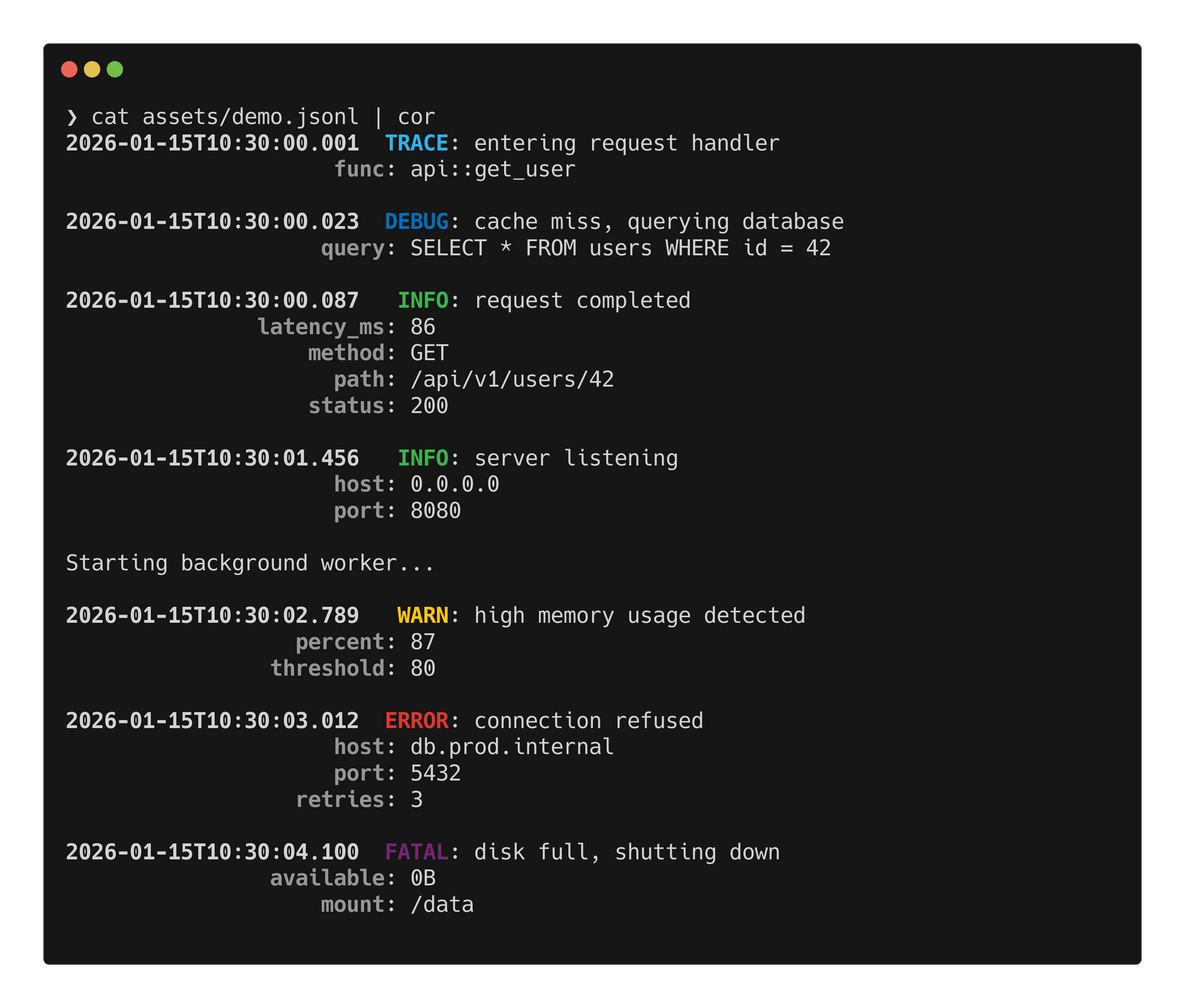
cat logs.jsonl | cor --level warn

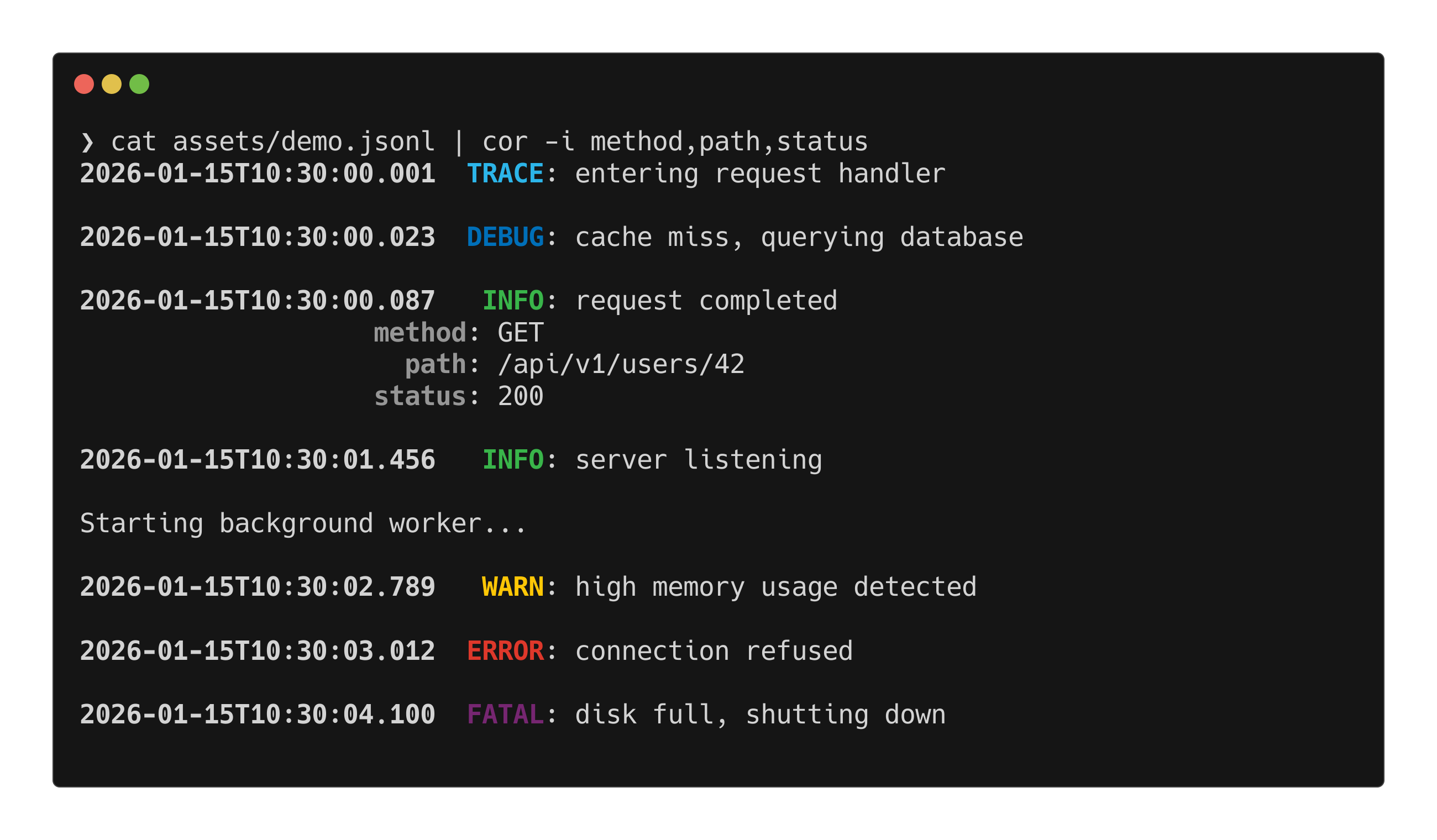
cat logs.jsonl | cor -i method,path,status
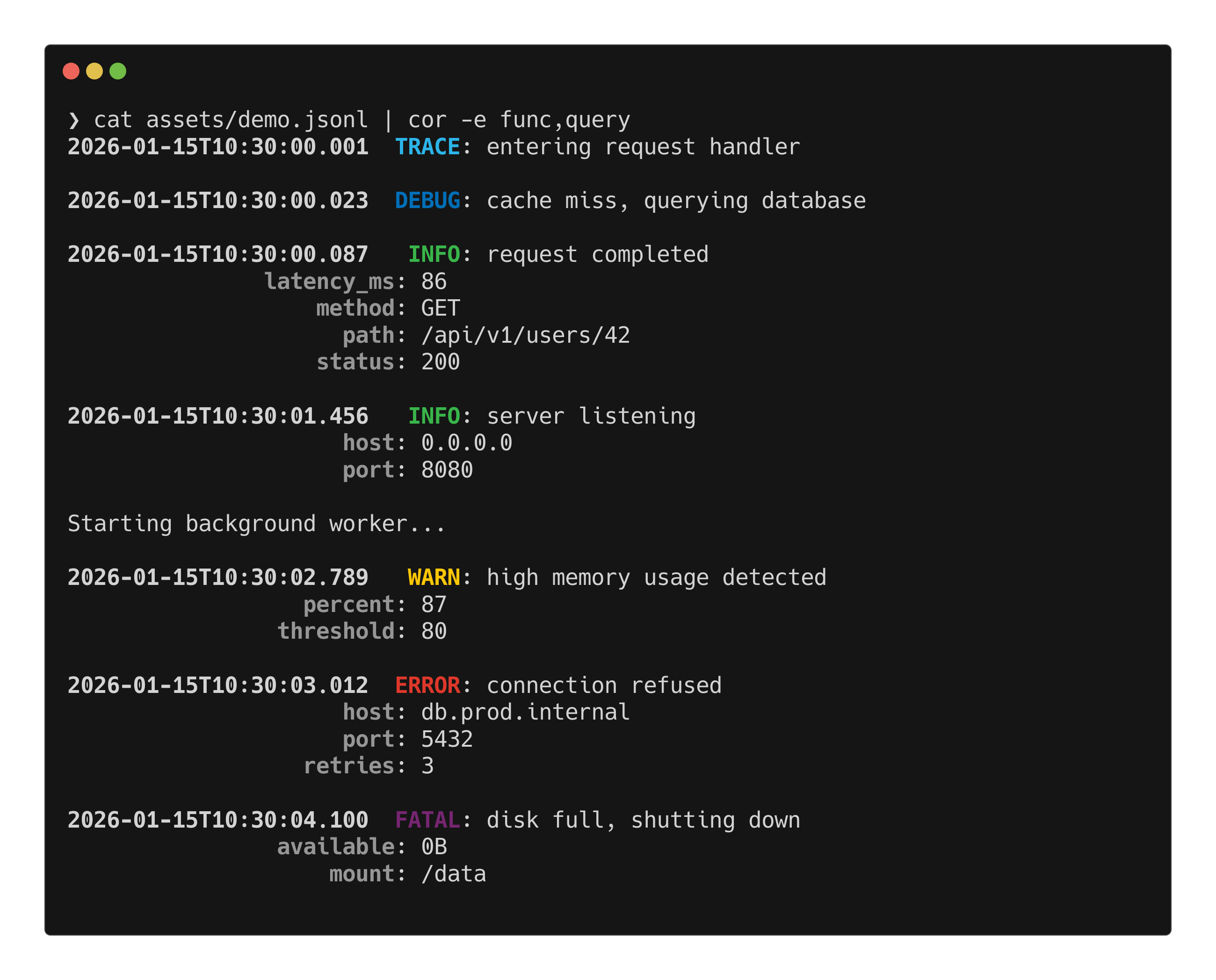
cat logs.jsonl | cor -e func,query
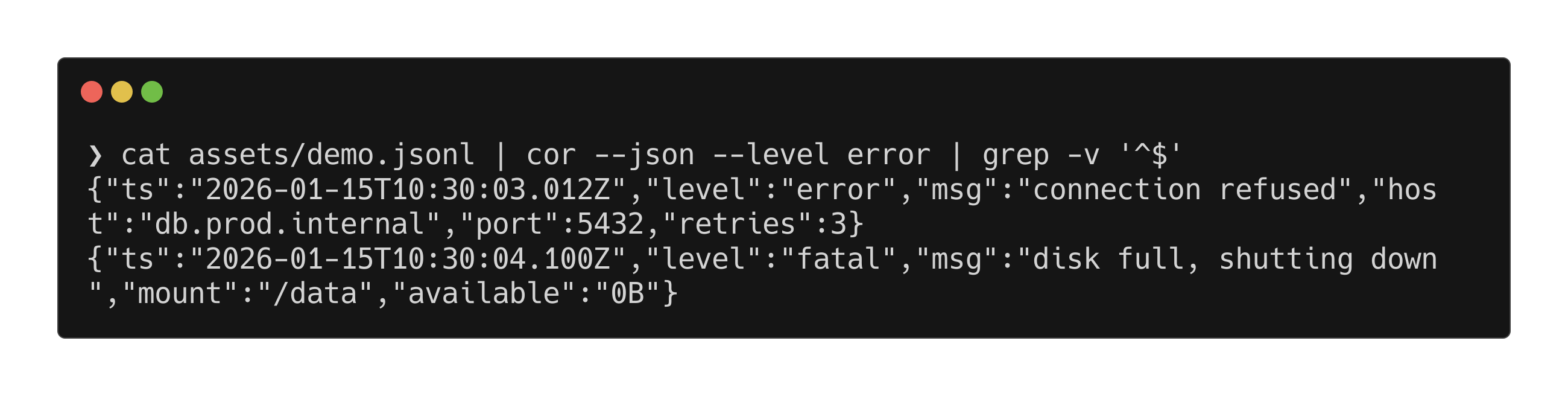
cat logs.jsonl | cor --json --level error
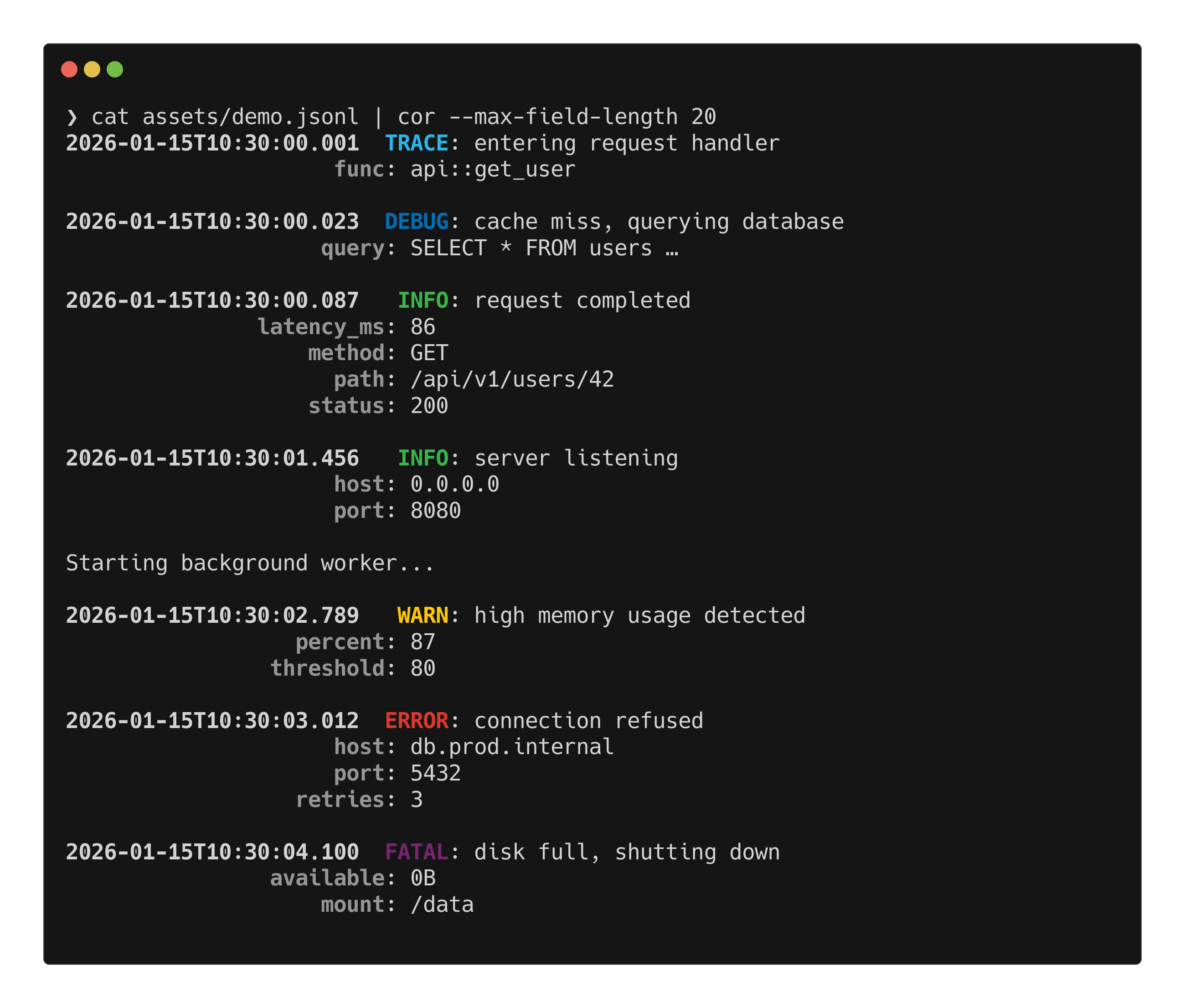
cat logs.jsonl | cor --max-field-length 20
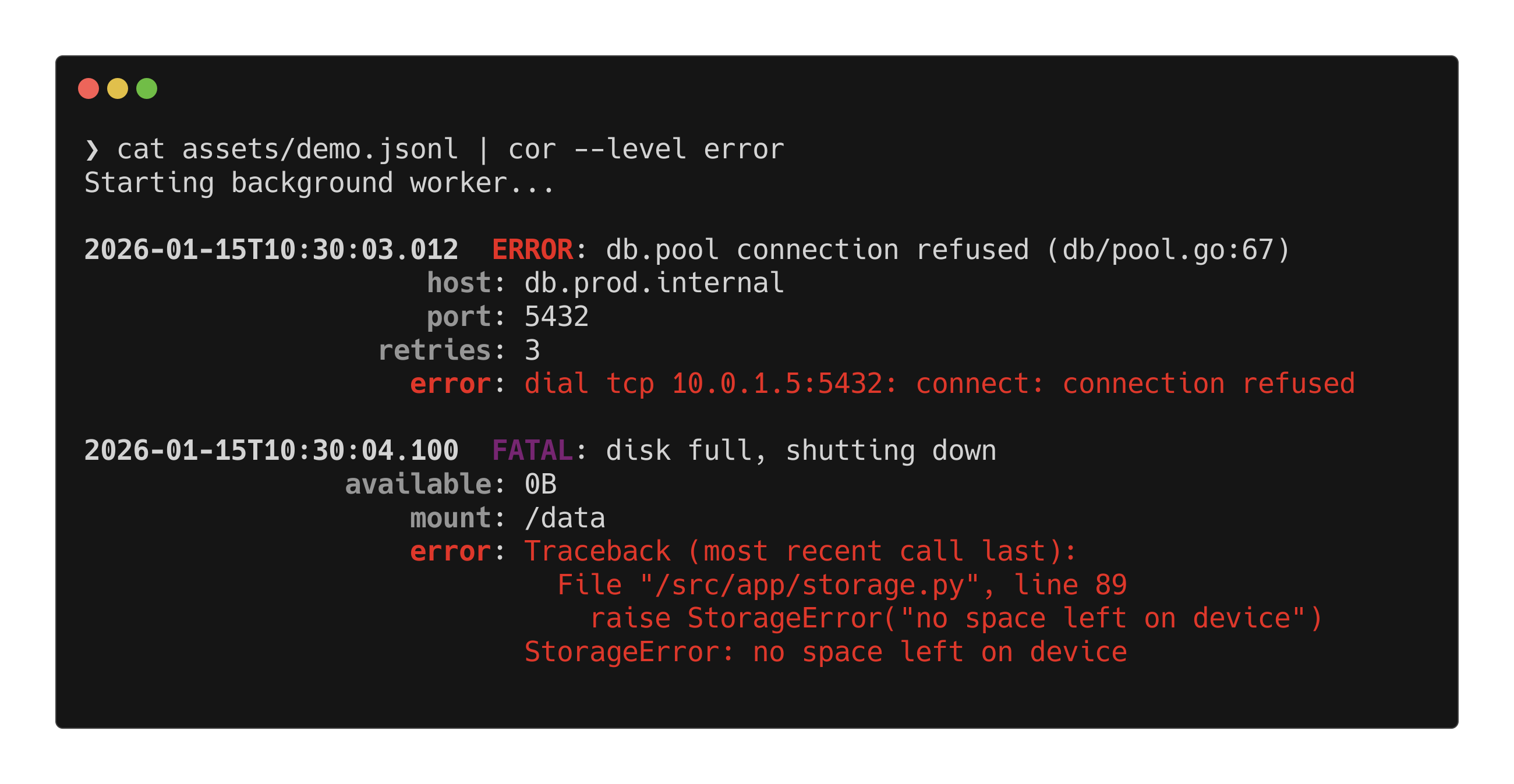
cat logs.jsonl | cor --level error
- Auto-detects fields from logrus, zap, slog, pino, bunyan, structlog, and more
- First-class structured fields — logger name, caller location, and error/stacktrace get dedicated formatting
- Embedded JSON — handles lines like
2026-01-15 10:30:00 {"level":"info",...} - Level filtering —
--level warnsuppresses debug and info - Numeric levels — bunyan/pino
30→info,40→warn, etc. - Custom keys —
--message-key,--level-key,--timestamp-key,--logger-key,--caller-key,--error-key - Field filtering —
--include-fieldsor--exclude-fields - JSON passthrough —
--jsonoutputs filtered JSON for piping - Truncation — long values truncated at 120 chars (configurable)
- Line gap — configurable blank lines between entries (default: 1)
- Grep filter —
--grep <PATTERN>regex filter across all field values - Single-line mode —
--single-linerenderskey=valpairs inline - No-extra mode —
--no-extrahides all extra fields for clean output - Timezone —
--timezone localor--timezone Europe/Berlin - File arguments —
cor app.logreads files directly (stdin if no args) - Shell completions —
--completions bash|zsh|fish|elvish|powershell - Config file —
~/.config/cor/config.tomlfor persistent settings - NO_COLOR — respects no-color.org convention
- Fast — ~400K lines/sec, O(line-length) memory, streaming I/O
cargo install corgit clone https://github.com/alexsavio/cor-cli.git
cd cor-cli
cargo install --path .Enable SIMD-accelerated JSON parsing via simd-json on supported architectures:
cargo install cor --features simdNote: For typical small log lines (<1KB), the default serde_json parser is
often faster. The simd feature benefits large JSON payloads (request/response
bodies, stack traces) where SIMD's throughput advantage outweighs the copy overhead.
# Pipe any JSON log stream
my-app | cor

# Read from files directly
cor app.log worker.log

# Filter by level
kubectl logs my-pod | cor --level warn

# Grep for a pattern across all fields
my-app | cor --grep "timeout|refused"

# Custom keys
my-app | cor --message-key event --level-key severity

# Custom keys for logger, caller, error
my-app | cor --logger-key source --caller-key origin --error-key stacktrace

# Only show specific fields
my-app | cor --include-fields=host,port,status

# Hide noisy fields
my-app | cor --exclude-fields=pid,hostname

# Hide all extra fields
my-app | cor --no-extra

# Compact single-line output
my-app | cor --single-line

# Output filtered JSON (for piping)
my-app | cor --level error --json | jq .

# Custom timestamp format
my-app | cor --timestamp-format '%H:%M:%S'

# Display timestamps in local timezone
my-app | cor --timezone local

# Disable truncation
my-app | cor --max-field-length=0

# Compact output (no blank lines between entries)
my-app | cor --line-gap=0

# Force colors in pipes
my-app | cor --color=always | less -R

# Generate shell completions
cor --completions zsh > _corYYYY-MM-DDTHH:MM:SS.mmm LEVEL: logger message (caller)
key: value
other_key: other_value
error: error message or stacktrace
- Timestamp — bold
YYYY-MM-DDTHH:MM:SS.mmmin UTC (configurable via--timezoneand--timestamp-format) - Level — colored and bold, right-justified in a 5-char field
- TRACE · DEBUG · INFO · WARN · ERROR · FATAL
- Logger — dimmed, after level badge (e.g.,
http.server) - Message — plain text
- Caller — dimmed, in parentheses after message (e.g.,
(server/router.go:118)) - Extra fields — one per line, key right-justified to 25 chars, bold gray (or inline
key=valwith--single-line) - Error — red, after extra fields; multiline stacktraces are preserved and indented
These levels are recognized (case-insensitive, with aliases):
| Level | Aliases | Numeric (bunyan/pino) |
|---|---|---|
| TRACE | trace, trc |
10 |
| DEBUG | debug, dbg |
20 |
| INFO | info, inf, information |
30 |
| WARN | warn, warning, wrn |
40 |
| ERROR | error, err, fatal_error |
50 |
| FATAL | fatal, critical, crit, panic, emerg |
60 |
Custom level aliases can be defined in the config file.
cor scans for well-known field names used by popular logging frameworks:
| Field | Aliases |
|---|---|
| Timestamp | time, ts, timestamp, @timestamp, datetime, date, t |
| Level | level, severity, loglevel, log_level, lvl, priority |
| Message | msg, message, text, log, body, event, short_message |
| Logger | logger, name, logger_name, component, module |
| Caller | caller, source, src, location, file, func, function |
| Error | error, err, exception, exc_info, stack_trace, stacktrace, stack |
CLI flags (--message-key, --level-key, --timestamp-key, --logger-key, --caller-key, --error-key) override auto-detection.
Lines with a text prefix before JSON are detected automatically:
2026-01-15 10:30:00.123 {"level":"info","msg":"server started","port":8080}
[INFO] 2026-01-15T10:30:01Z {"level":"debug","msg":"config loaded"}
myapp | {"level":"warn","msg":"disk space low"}
The prefix is preserved in the output after the level badge.
Nested JSON objects are flattened using dot notation:
{"level":"info","msg":"req","http":{"method":"GET","status":200}}INFO: req
http.method: GET
http.status: 200
cor loads ~/.config/cor/config.toml (or $XDG_CONFIG_HOME/cor/config.toml) if present. CLI flags always take precedence.
# Default minimum level
level = "info"

# Color mode: auto, always, never
color = "auto"

# Timestamp display format (strftime)
timestamp_format = "%Y-%m-%dT%H:%M:%S%.3f"

# Max field value length (0 = unlimited)
max_field_length = 120

# Blank lines between entries (0 = compact)
line_gap = 1

# Minimum width for field key alignment (default: 25)
key_min_width = 25

# Render extra fields inline as key=val (default: false)
# single_line = true

# Timezone for timestamp display: "UTC" (default), "local", or IANA name
# timezone = "local"
# timezone = "Europe/Berlin"

# Examples of custom timestamp formats:
# timestamp_format = "%H:%M:%S%.3f"    # time only with milliseconds
# timestamp_format = "%H:%M:%S"        # time only, no milliseconds

# Override field key names
[keys]
message = "msg"
level = "level"
timestamp = "ts"
logger = "logger"
caller = "caller"
error = "error"

# Map custom level names → standard levels
[levels]
"verbose" = "debug"
"critical" = "fatal"
"success" = "info"

# Custom colors for level badges
# Available colors: black, red, green, yellow, blue, magenta, purple, cyan, white
# Bright variants: bright_black, bright_red, bright_green, bright_yellow,
#                  bright_blue, bright_magenta, bright_cyan, bright_white
[colors]
trace = "cyan"
debug = "blue"
info = "green"
warn = "yellow"
error = "red"
fatal = "magenta"| Variable | Effect |
|---|---|
NO_COLOR |
Disables colors when set (any non-empty value) |
FORCE_COLOR |
Enables colors even when not a TTY |
TERM=dumb |
Disables colors in auto mode |
--color=always and --color=never override all environment variables.
cor [OPTIONS] [FILES]...

Arguments:
  [FILES]...                       Input files (reads stdin if none given, `-` for explicit stdin)

Options:
  -c, --color <COLOR>              Color mode [default: auto] [values: auto, always, never]
  -l, --level <LEVEL>              Minimum severity level [values: trace, debug, info, warn, error, fatal]
  -G, --grep <PATTERN>             Filter lines by regex across all field values
  -m, --message-key <KEY>          Override message field key
      --level-key <KEY>            Override level field key
  -t, --timestamp-key <KEY>        Override timestamp field key
      --logger-key <KEY>           Override logger name field key
      --caller-key <KEY>           Override caller/source field key
      --error-key <KEY>            Override error/stacktrace field key
  -i, --include-fields <FIELDS>    Only show these fields (comma-separated)
  -e, --exclude-fields <FIELDS>    Hide these fields (comma-separated)
  -n, --no-extra                   Hide all extra fields
  -S, --single-line                Render extra fields inline as key=val
  -j, --json                       Output raw JSON instead of colorized text
  -T, --timestamp-format <FMT>    Timestamp display format (strftime)
  -z, --timezone <TZ>             Timezone: UTC (default), local, or IANA name
  -M, --max-field-length <N>       Max field value length [default: 120]
  -g, --line-gap <N>               Blank lines between entries [default: 1]
      --key-min-width <N>          Minimum key alignment width [default: 25]
      --config <PATH>              Path to config file
  -v, --verbose                    Show parse errors for malformed JSON lines
      --completions <SHELL>        Generate shell completions [values: bash, zsh, fish, elvish, powershell]
  -h, --help                       Print help
  -V, --version                    Print version
MIT — Alexandre Savio