- Description: A system to add an authentication to the Reblocks based web-site.
- Licence: Unlicense
- Author: Alexander Artemenko svetlyak.40wt@gmail.com
- Homepage: https://40ants.com/reblocks-auth/
- Bug tracker: https://github.com/40ants/reblocks-auth/issues
- Source control: GIT
- Depends on: alexandria, babel, cl-strings, dexador, ironclad, jonathan, local-time, log4cl, log4cl-extras, mailgun, mito, quri, reblocks, reblocks-lass, reblocks-ui, secret-values, serapeum, uuid, yason


Reblocks-auth is a system for adding authentication for your Reblocks application. It allows users to login using multiple ways. Right now GitHub is only supported but the list will be extended.
This system uses Mito as a storage to store data about users and their data from service providers. Each user has a unique nickname and an optional email. Also, one or more identity providers can be bound to each user account.
You can install this library from Quicklisp, but you want to receive updates quickly, then install it from Ultralisp.org:
(ql-dist:install-dist "http://dist.ultralisp.org/"
                      :prompt nil)
(ql:quickload :reblocks-auth)
I've made an example application to demonstrate how does reblocks-auth system work.
To start this example application, run this code in the REPL:
(asdf:load-system :reblocks-auth-example)

(reblocks-auth-example/server:start :port 8080)
When you'll open the http://localhost:8080/ you will see this simple website:
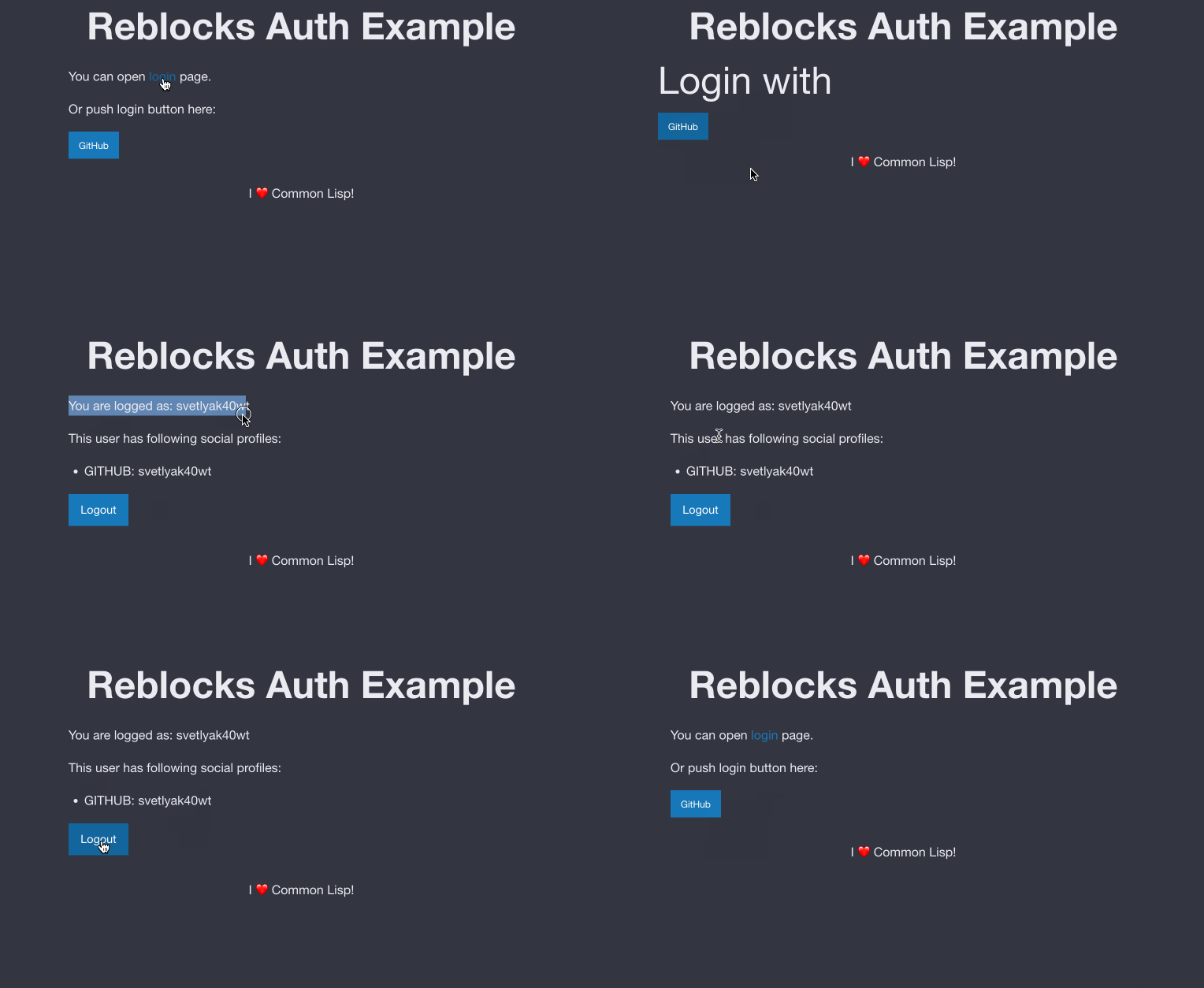
This system provides a way for user authentifications. Each user is represented in the database
using reblocks-auth/models:user model user can be bound to one or more "social profiles" -
reblocks-auth/models:social-profile. For example, if user logged in via GitHub, then
database will store one "user" record and one "social-profile" record. Each social profile
can hold additional information in it's metadata slot.
To use this system, you have to define two routes which will be responsible for login and logout.
On each route you have to render either reblocks-auth:login-processor or reblocks-auth:logout-processor widgets.
Usually you can define your routes like this (reblocks-navigation-widget:defroutes is used here):
(defroutes routes
    ("/" (make-page-frame
          (make-landing-page)))
  ("/login"
   (make-page-frame
    (reblocks-auth:make-login-processor)))
  ("/logout"
   (make-page-frame
    (reblocks-auth:make-logout-processor))))
This code will render a set up buttons to login through enabled service providers.
Enabled service providers are listed in reblocks-auth:*enabled-services* variable.
Login processor does two things:
- renders buttons for enabled service providers calling
reblocks-auth/button:rendergeneric-function. - service processor is executed when user clicks a "login" button. For example GitHub processor redirects to https://github.com/login/oauth/authorize
- when user comes back to /login page, service processor gets or creates entries in the database and stores current user in the session.
- after this, any code can retrieve current user by a call to
reblocks-auth/models:get-current-user.
Logout processor renders a "logout" button and when user clicks on it, removes user from the current session.
Telegram authentication uses the Telegram Login Widget.
When a user clicks the widget, Telegram opens a confirmation dialog and then redirects back
to your server with signed user data. The server verifies the HMAC-SHA256 signature using
the bot token before accepting the login.
- Open @BotFather in Telegram and send
/newbot. - After the bot is created, send
/setdomainand enter your website's domain (e.g.example.com). Telegram will reject logins from any other domain. - Copy the bot username (without
@) and the bot token shown by BotFather.
(setf reblocks-auth/providers/telegram:*bot-username* "MyAppBot")
(setf reblocks-auth/providers/telegram:*bot-token*
      (secret-values:conceal-value "123456:ABC-DEF..."))

(pushnew :telegram reblocks-auth:*enabled-services*)
Two variables control the provider:
reblocks-auth/providers/telegram:*bot-username*— the bot username registered with BotFather (used to render the widget).reblocks-auth/providers/telegram:*bot-token*— the bot token used server-side to verify the authentication hash. Never expose this value to the browser. Accepts a plain string or asecret-values:secret-value.
- The widget script is rendered as a
<script>tag withdata-auth-urlpointing to/login?service=telegram. - When a user clicks the widget, Telegram opens a confirmation dialog.
- On success Telegram appends
id,first_name,last_name,username,photo_url,auth_date, andhashto thedata-auth-urland redirects the browser there. - The
login-processorwidget picks up theservice=telegramparameter and callsreblocks-auth/auth:authenticate. - The server verifies the
HMAC-SHA256signature and checks thatauth_dateis no older than 24 hours. - The user record is looked up or created and stored in the session.
Telegram requires a real public domain — localhost is not accepted. For local
development, expose your server with a tunneling tool and register that domain
with BotFather:
# ngrok (free tier gives a random HTTPS URL each run)
ngrok http 8080

# localtunnel (fixed subdomain)
npx localtunnel --port 8080 --subdomain myapp
Then in BotFather send /setdomain with the tunnel hostname (e.g. myapp.loca.lt).
Open the app through the tunnel URL rather than localhost:8080.
Yandex SmartCaptcha provides an alternative to Google reCAPTCHA for protecting
the email-based authentication form.
To enable Yandex SmartCaptcha, set following variables:
(setf reblocks-auth/providers/email/processing:*smartcaptcha-client-key* "your-client-key")
(setf reblocks-auth/providers/email/processing:*smartcaptcha-server-key* "your-server-key")- Go to Yandex Cloud Console
- Navigate to SmartCaptcha service
- Create a new SmartCaptcha site
- Copy Client key (for frontend) and Server key (for backend)
- Add keys to your application configuration
- User clicks "Email" login button
- JavaScript loads
https://smartcaptcha.yandexcloud.net/captcha.js - User solves captcha (automatic or manual)
- Token is generated and sent to backend
- Backend validates token via
https://smartcaptcha.yandexcloud.net/validate - Email with login code is sent
- User enters code to complete authentication
Yandex SmartCaptcha takes precedence when both Yandex SmartCaptcha
and Google reCAPTCHA are configured.
If only Google reCAPTCHA is configured, it will be used.
The server validates the captcha token via the verify-smartcaptcha function,
which POSTs the token and server key to Yandex's validation endpoint.
Successful validation returns {"status": "ok"}.
Failed validation returns {"status": "error"}.
package reblocks-auth/auth
generic-function reblocks-auth/auth:authenticate service &rest params &key id first_name last_name username photo_url auth_date hash retpath code
Called when user had authenticated in the service and returned to our site.
All GET arguments are collected into a plist and passed as params.
Should return two values a user and a flag denotifing if user was just created.
package reblocks-auth/button
generic-function reblocks-auth/button:render service &key retpath
Renders a button for given service. Service should be a keyword like :github or :facebook.
package reblocks-auth/conditions
condition reblocks-auth/conditions:unable-to-authenticate ()
Readers
reader reblocks-auth/conditions:get-message (unable-to-authenticate) (:message)
reader reblocks-auth/conditions:get-reason (unable-to-authenticate) (:reason = 'nil)
package reblocks-auth/core
class reblocks-auth/core:login-processor (widget)
This widget should be rendered to process user's login.
class reblocks-auth/core:logout-processor (widget)
This widget should be rendered to process user's logout.
generic-function reblocks-auth/core:render-login-page app &key retpath
By default, renders a list of buttons for each allowed authentication method.
function reblocks-auth/core:make-login-processor
function reblocks-auth/core:make-logout-processor
function reblocks-auth/core:render-buttons &key (retpath (get-path))
Renders a row of buttons for enabled service providers.
Optionally you can specify RETPATH argument with an URI to return user
after login.
variable reblocks-auth/core:*allow-new-accounts-creation* t
When True, a new account will be created. Otherwise only already existing users can log in.
variable reblocks-auth/core:*enabled-services* (:github)
Set this variable to limit a services available to login through.
variable reblocks-auth/core:*login-hooks* nil
Append a funcallable handlers which accept single argument - logged user.
package reblocks-auth/errors
condition reblocks-auth/errors:nickname-is-not-available (error)
Signalled when there is already a user with given nickname.
package reblocks-auth/github
function reblocks-auth/github:get-scopes
Returns current user's scopes.
function reblocks-auth/github:get-token
Returns current user's GitHub token.
function reblocks-auth/github:render-button &KEY (CLASS "button small") (SCOPES *DEFAULT-SCOPES*) (TEXT "Grant permissions") (RETPATH (GET-URI))
Renders a button to request more scopes.
variable reblocks-auth/github:*client-id* nil
OAuth client id
variable reblocks-auth/github:*default-scopes* ("user:email")
A listo of default scopes to request from GitHub.
variable reblocks-auth/github:*secret* nil
OAuth secret. It might be a string or secret-values:secret-value.
package reblocks-auth/models
class reblocks-auth/models:social-profile (serial-pk-mixin dao-class record-timestamps-mixin)
Represents a User's link to a social service. User can be bound to multiple social services.
Readers
reader reblocks-auth/models:profile-metadata (social-profile) (:metadata :params)
A hash table with lowercased strings as a key and values given from the authentication plroviders.s
reader reblocks-auth/models:profile-service (social-profile) (:service)
reader reblocks-auth/models:profile-service-user-id (social-profile) (:service-user-id)
A user instance, bound to the social-profile.
Accessors
accessor reblocks-auth/models:profile-metadata (social-profile) (:metadata :params)
A hash table with lowercased strings as a key and values given from the authentication plroviders.s
class reblocks-auth/models:user (serial-pk-mixin dao-class record-timestamps-mixin)
This class stores basic information about user - it's nickname and email.
Additional information is stored inside social-profile instances.
Readers
reader reblocks-auth/models:get-email (user) (:email = nil)
reader reblocks-auth/models:get-nickname (user) (:nickname)
function reblocks-auth/models:anonymous-p user
function reblocks-auth/models:change-email user email
function reblocks-auth/models:change-nickname new-nickname
Changes nickname of the current user.
function reblocks-auth/models:create-social-user service service-user-id &rest kwargs &key email first-name last-name username photo-url
function reblocks-auth/models:find-social-user service service-user-id
function reblocks-auth/models:get-all-users
function reblocks-auth/models:get-current-user
Returns current user or NIL.
function reblocks-auth/models:get-user-by-email email
Returns a user with given email.
function reblocks-auth/models:get-user-by-nickname nickname
Returns a user with given email.
function reblocks-auth/models:user-social-profiles user
Returns a list of social profiles, bound to the user.
variable reblocks-auth/models:*user-class* user
Allows to redefine a model, for users to be created by the reblocks-auth.
package reblocks-auth/providers/email/mailgun
macro reblocks-auth/providers/email/mailgun:define-code-sender NAME (FROM-EMAIL URL-VAR &KEY (SUBJECT "Authentication code")) &BODY HTML-TEMPLATE-BODY
package reblocks-auth/providers/email/models
class reblocks-auth/providers/email/models:registration-code (serial-pk-mixin dao-class record-timestamps-mixin)
This model stores a code sent to an email for signup or log in.
Readers
reader reblocks-auth/providers/email/models:registration-code (registration-code) (:code)
reader reblocks-auth/providers/email/models:registration-email (registration-code) (:email)
User's email.
reader reblocks-auth/providers/email/models:valid-until (registration-code) (:valid-until)
Expiration time.
function reblocks-auth/providers/email/models:send-code email &key retpath send-callback
Usually you should define a global callback using
reblocks-auth/providers/email/mailgun:define-code-sender macro,
but you can provide an alternative function to handle
email sending.
variable reblocks-auth/providers/email/models:*send-code-callback* -unbound-
Set this variable to a function of one argument of class registration-code.
It should send a registration code using template, suitable for your website.
package reblocks-auth/providers/email/processing
class reblocks-auth/providers/email/processing:request-code-form (widget)
Readers
reader reblocks-auth/providers/email/processing:retpath (request-code-form) (:retpath)
reader reblocks-auth/providers/email/processing:sent (request-code-form) (= nil)
Accessors
accessor reblocks-auth/providers/email/processing:sent (request-code-form) (= nil)
generic-function reblocks-auth/providers/email/processing:form-css-classes widget
generic-function reblocks-auth/providers/email/processing:render-email-input widget
generic-function reblocks-auth/providers/email/processing:render-sent-message widget
generic-function reblocks-auth/providers/email/processing:render-submit-button widget
variable reblocks-auth/providers/email/processing:*recaptcha-secret-key* nil
Set this variable to a secret key, generated by Google reCaptcha.
variable reblocks-auth/providers/email/processing:*recaptcha-site-key* nil
Set this variable to a site key, generated by Google reCaptcha.
variable reblocks-auth/providers/email/processing:*smartcaptcha-client-key* nil
Set this variable to a client key, generated by Yandex SmartCaptcha.
variable reblocks-auth/providers/email/processing:*smartcaptcha-server-key* nil
Set this variable to a server key, generated by Yandex SmartCaptcha.
package reblocks-auth/providers/email/resend
function reblocks-auth/providers/email/resend:make-code-sender thunk &key base-uri
Makes a function which will prepare params and call THUNK function with email and URL.
Usually you don't need to call this function directly and you can use just define-code-sender macro.
macro reblocks-auth/providers/email/resend:define-code-sender NAME (FROM-EMAIL URL-VAR &KEY (SUBJECT "Authentication code")) &BODY HTML-TEMPLATE-BODY
package reblocks-auth/providers/telegram
function reblocks-auth/providers/telegram:render-button &key retpath
Renders the Telegram Login Widget script tag.
variable reblocks-auth/providers/telegram:*bot-token* nil
Telegram bot token used to verify authentication data. Can be a string or secret-values:secret-value.
variable reblocks-auth/providers/telegram:*bot-username* nil
Telegram bot username (without @). Required for the login widget.
- Add support for authentication by a link sent to the email.
- Add ability to bind multiple service providers to a single user.